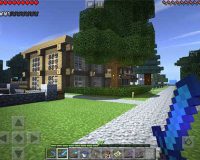
Minecraft Education is a specialized version of the sandbox platform adapted for structured learning environments. It uses the same block-based world system to support academic instruction rather than entertainment-focused play. The platform is designed to help teachers present concepts through interactive tasks, where students learn by building, exploring, and testing ideas inside a controlled digital space. Lessons are aligned with educational standards and can be adjusted for different age groups and subjects, making the game suitable for both primary and secondary education.
Guided Environments And Teacher Control
Unlike open public versions of the game, Minecraft Education emphasizes classroom management and supervision. Educators can create or import lesson worlds with predefined goals and rules. Tools allow teachers to monitor student activity, restrict certain actions, or pause the entire class when instruction is needed. Communication features support real-time guidance without leaving the game environment. These controls help maintain focus while still allowing students to work independently or in groups.
In everyday classroom use, the platform relies on several integrated features:
- teacher-created or prebuilt lesson worlds
- non-player characters that provide instructions and hints
- collaborative multiplayer sessions with access controls
- tools for capturing screenshots and recording progress
These features connect in-game activity with formal assessment and feedback.
Curriculum Integration And Learning Outcomes
Minecraft Education is used across multiple disciplines by translating abstract ideas into interactive models. In history lessons, students may recreate historical sites or events. In science classes, they can simulate ecosystems or explore cause-and-effect relationships. Mathematics concepts such as scale, volume, and coordinates are reinforced through construction tasks. Coding modules introduce logical thinking by allowing students to automate actions using block-based or text-based programming. This approach supports learning through application rather than memorization.
Accessibility And Student Engagement
The platform includes accessibility options to support diverse learning needs, such as text-to-speech, adjustable controls, and visual aids. Familiar gameplay mechanics reduce the learning curve, allowing students to focus on educational content instead of interface complexity. Collaborative tasks encourage communication and shared problem-solving, helping students develop social and organizational skills alongside academic knowledge.
































Advertisement